公司幫我換新NB了,IBM T60P,或許現在不該說IBM了,是聯想。
真搞不懂公司IT的想法,大多人其實換的新NB是T60,只有我跟Michael是T60P,他或許覺得我跟Michael之前NB是D800跟大家不一樣,所以我們要用較好的?管他,賺到了!
2007年8月24日


個人卡拉贊"艾蘭"首推
來的真遲啊,公會都一堆人卡拉破關了。 =_=
昨天的卡拉還真不錯玩,小德在BC之後的改良,讓我更喜愛這個職業了,坦、補、DPS都可以有不錯表現。
昨天較遺憾一點是竟忘了拍照,年紀大了,最近常忘東忘西....
昨天的卡拉還真不錯玩,小德在BC之後的改良,讓我更喜愛這個職業了,坦、補、DPS都可以有不錯表現。
昨天較遺憾一點是竟忘了拍照,年紀大了,最近常忘東忘西....
2007年6月8日
2005年8月21日
特別的wiki:TiddlyWiki
發現一個很特別的wiki,TiddlyWiki。所有內容都在一個html檔,以html + css + javascript為架構,正因為如此,它不需要web server,只要有瀏覽器(firefox/IE),就可以跑了。建議用firefox,可以得到比較好的javascript效果。
它很適合做個人的記事本,紀錄學習筆記或日記都很適合,也可以順便當作Blog,並且也是很好的javascript範例。
它很適合做個人的記事本,紀錄學習筆記或日記都很適合,也可以順便當作Blog,並且也是很好的javascript範例。
2005年8月15日
firefix的"No common encryption algorithms"問題終於解決
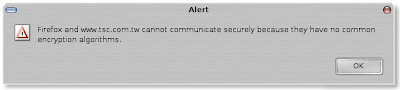
這個問題已經很久了,印象中從firefox升級到1.0.3之後就有的,當時有試著去網路上找尋解法,不過一直找不到,只好消極的想,下一個版本就會修好,想不到這個想法就一直拖到1.0.6。於是今天狠下心來再去網路上找解答,終於皇天不負苦心人,找到這個連結:
簡單來說,改法就是在firefox的location那邊輸入about:config然後按enter,這樣會進入一個config網頁,然後在 filter裡輸入security,網頁都會過濾剩下跟security相關的設定,想改設定的話,只要在上面double click就可以,以我個例子,我是把"security.ssl3.rsa_rc4_40_md5"改成true,這樣我上面貼圖的Alert就不會出 現了。終於又可以用firefox上台證下單啦!
2005年7月23日
解決mount vfat filename大寫問題
這問題困擾我好一陣子,在Linux下mount windows的partition,會遇到一個問題,如果你建一個檔名是ABC,會被自動改成小寫的abc,好不容易讓我找到解決方法。
參考man mount:
參考man mount:
shortname=[lower|win95|winnt|mixed]所以下次我要mount PSP時只要加上-o shortname=winnt就可以了。
Defines the behaviour for creation and display of filenames which fit into
8.3 characters. If a long name for a file exists, it will always be pre-
ferred display. There are four modes:
lower Force the short name to lower case upon display; store a long name
when the short name is not all upper case.
win95 Force the short name to upper case upon display; store a long name
when the short name is not all upper case.
winnt Display the shortname as is; store a long name when the short name is
not all lower case or all upper case.
mixed Display the short name as is; store a long name when the short name
is not all upper case.
The default is "lower".
2005年6月20日
解決 FireFox 在RichHTML Copy/Paste 問題
之前雖然有用修改user.js的方法讓firefox可以在xuite上copy/paste,可是後來在google上search看到這篇[教學]解決 FireFox 在RichHTML Copy/Paste 問題的第一篇回應,原來用shift+insert也可以。真是太好了,這樣更簡單。
至於user.js的方法如下:
到Profile目錄
windows:
在開始上打%AppDaa%,到MozillaFirefoxProfilexxxxx.default
Linux:
$HOME/.mozilla/firefox/xxxx.default
修改/增加user.js檔,增加這段
user_pref("capability.policy.policynames", "allowclipboard");
user_pref("capability.policy.allowclipboard.Clipboard.paste", "allAccess");
如果需要多個網站,可使用空白分開,例如
user_pref("capability.policy.allowclipboard.sites", "http://www.mozilla.org http://blog.xuite.net");
至於user.js的方法如下:
到Profile目錄
windows:
在開始上打%AppDaa%,到MozillaFirefoxProfilexxxxx.default
Linux:
$HOME/.mozilla/firefox/xxxx.default
修改/增加user.js檔,增加這段
user_pref("capability.policy.policynames", "allowclipboard");
user_pref("capability.policy.allowclipboard.sites", "http://www.mozilla.org");
user_pref("capability.policy.allowclipboard.Clipboard.cutcopy", "allAccess");user_pref("capability.policy.allowclipboard.Clipboard.paste", "allAccess");
如果需要多個網站,可使用空白分開,例如
user_pref("capability.policy.allowclipboard.sites", "http://www.mozilla.org http://blog.xuite.net");
訂閱:
文章 (Atom)